Every gram you buy, cook and sell — accounted for.
Point of sale, inventory, recipes, purchasing, accounting and payroll in one system, in English and Arabic. Know what a dish really costs you the day you sell it — not when the month closes.
We set it up and email your login within 1 business day. 14 days free from then, no card needed. Your data stays yours.
English and Arabic
Auto-Clerk for supplier bills
Full accounting and VAT (ZATCA-ready)
Time & attendance and payroll
Branches and central kitchens
Buffet costing built in
Buffet costing — Run a buffet? Pans are weighed at close and the food cost per cover is posted every day.
English + Arabic — right to left, end to end
Buffet costing — cost per cover, every day
1 business day — to set up your workspace
14 days free — no card needed
Everything your restaurant runs on
One system, from the till to the trial balance.
Point of sale and kitchen screens
Dine-in, takeaway and delivery-app orders, split payments and item refunds. Each item goes to its own kitchen station's screen, and guests can order from a QR code at the table.
The Auto-Clerk for supplier bills
Photograph or upload a supplier bill: it is read, matched to your items and — when every check passes — posted as a goods receipt by the Auto-Clerk. Anything doubtful comes to you as a plain question.
Accounting and VAT
A real double-entry ledger: P&L per branch, balance sheet, cash flow, supplier and customer accounts, bank reconciliation, the VAT return and period lock. ZATCA-ready e-invoicing.
Time, attendance and payroll
Clock-in checked against the branch location, rosters, leave, payroll runs posted to the books, payslips, loans and end-of-service — with an app on every employee's phone.
Recipes and true food cost
Recipes and sub-recipes down to the gram, with yields. The cost of every dish updates when an ingredient's price moves, and theoretical cost is set against actual.
Buffet costing
Batches cooked for the buffet, covers counted at the till, every pan weighed at close and the buffet's food cost posted to its own account — with cost per cover and margin for each day.
Inventory that reconciles
Daily counts per location that approve themselves inside tolerance, transfers, requisitions and waste — in the units your kitchen actually uses.
Many branches, one company
Branches, a central kitchen and warehouses in one set of books. Transfers are received at the other end, and every report can be run per branch or for the whole company.
Production and weigh-out
Production plans for the central kitchen, batches and sub-products, and a weigh-out at close so what was cooked and what was left is on the record.
Catering and events
Quotations priced per person, A4 quotations and tax invoices, deposits and payments — and the food's cost booked when the order is delivered.
Delivery-app orders
Delivery-app orders at the till, each app with its own account, and its payouts and commission recorded against what it owes you.
Your currency, and foreign ones
Each company keeps its books in its own currency. Supplier bills, payments and bank accounts in another currency are booked at a stored exchange rate.
Groups of companies
Run more than one company with a single sign-in, and see them side by side, with consolidated statements for the group.
Reports and an owner dashboard
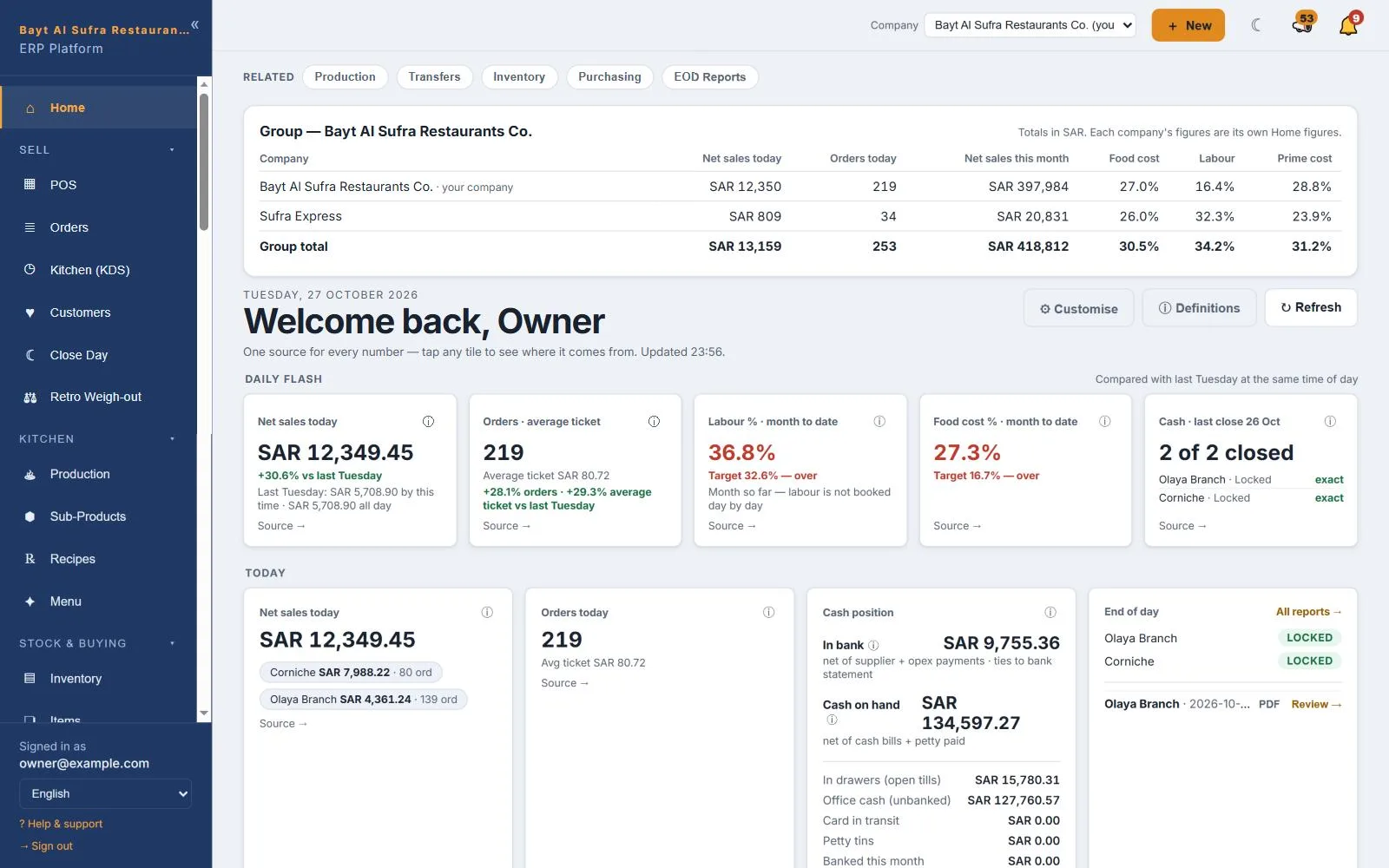
An owner dashboard where every number opens its source, a management report, item performance and saved reports — exportable to CSV and PDF.
One system from the till to the trial balance
Pick an area to see what it does today. Every part shares the same items, branches and books.
Point of sale & kitchen — A till and kitchen screens that keep up with service
Dine-in, takeaway and delivery-app orders on one till, with every item sent to the station that cooks it.
A kitchen screen per station: each item is routed to its own station, with a pass view and recall
Guests order from a QR code at the table; the order arrives on the till for the table
Several payment methods on one bill, and refunds of the whole bill or only the lines and quantities returned
Optional offline cash selling: if the connection drops while the till is open, sales queue on the device and sync when it is back
Staff meals recorded against the employee, with the stock relieved and costed
Manager PIN for voids, discounts and refunds, with limits per role
Inventory & stock truth — Stock that matches the shelf, branch by branch
Counts, transfers, requisitions and waste in the units your kitchen uses — and rules for when the numbers disagree.
Daily counting sheets that can approve themselves when every line is inside tolerance
Transfers and requisitions between branches, central kitchen and warehouse, received at the other end; short or extra arrivals are booked
Auto-source (optional): when a branch uses stock that is still held at the warehouse, the transfer is written for it
Going below zero follows your rule — warn, refuse or auto-source — and a production shortfall can require a written reason
Waste recorded with a reason and costed at the branch's average cost
Packs, cases and recipe units converted to stock units
Recipes & production — Know what every dish and every batch really costs
Recipes priced from what you actually paid, production planned and weighed, and a check on whether your recipes match reality.
Recipes and sub-recipes (semi-finished items) to the gram, with yield and trim loss per line
A new purchase price flows through every recipe that uses the ingredient
Theoretical against actual food cost, per item and per branch
Recipe accuracy: between two counts it compares what the recipes say was used with what actually went, names the likely cause and suggests a quantity — a person decides
Production plans and runs for the central kitchen, with each batch's cost
A weigh-out at close, for the buffet and à la carte separately
Buffet costing — A buffet costed cover by cover
Few restaurant systems can tell you what a buffet really cost. Restop follows the food from the pan to the books.
Batches cooked for the buffet, each carrying the real cost of its ingredients
A live cost ceiling during service, against cover revenue so far
Adult and child covers counted at the till
Every pan weighed at close, and the buffet's food cost posted to its own account
Disposables counted too, and food cost per cover for every day
Purchasing & the Auto-Clerk — Supplier bills read for you, and posted when they check out
The Auto-Clerk does the routine through the same steps a person would — and stops to ask the moment something does not add up.
Photograph a supplier bill or upload the PDF — or let anyone at the branch drop it through a printed QR code
Bill lines matched to your items; it learns each supplier's wording and flags the lines it is unsure of
The Auto-Clerk posts captured bills as goods receipts, saves expense bills and approves day-close reports — only when every check passes
Its checks: the bill adds up, the invoice number is new, the pack size is real and the price is within range of your running cost; otherwise you get a plain question
Purchase orders, goods receipts, and one supplier tax invoice matched across several receipts
Input VAT booked on every bill from a VAT-registered supplier
Accounting & VAT — Real books, closed every day
Every sale, purchase, payroll run and day close lands in a double-entry general ledger.
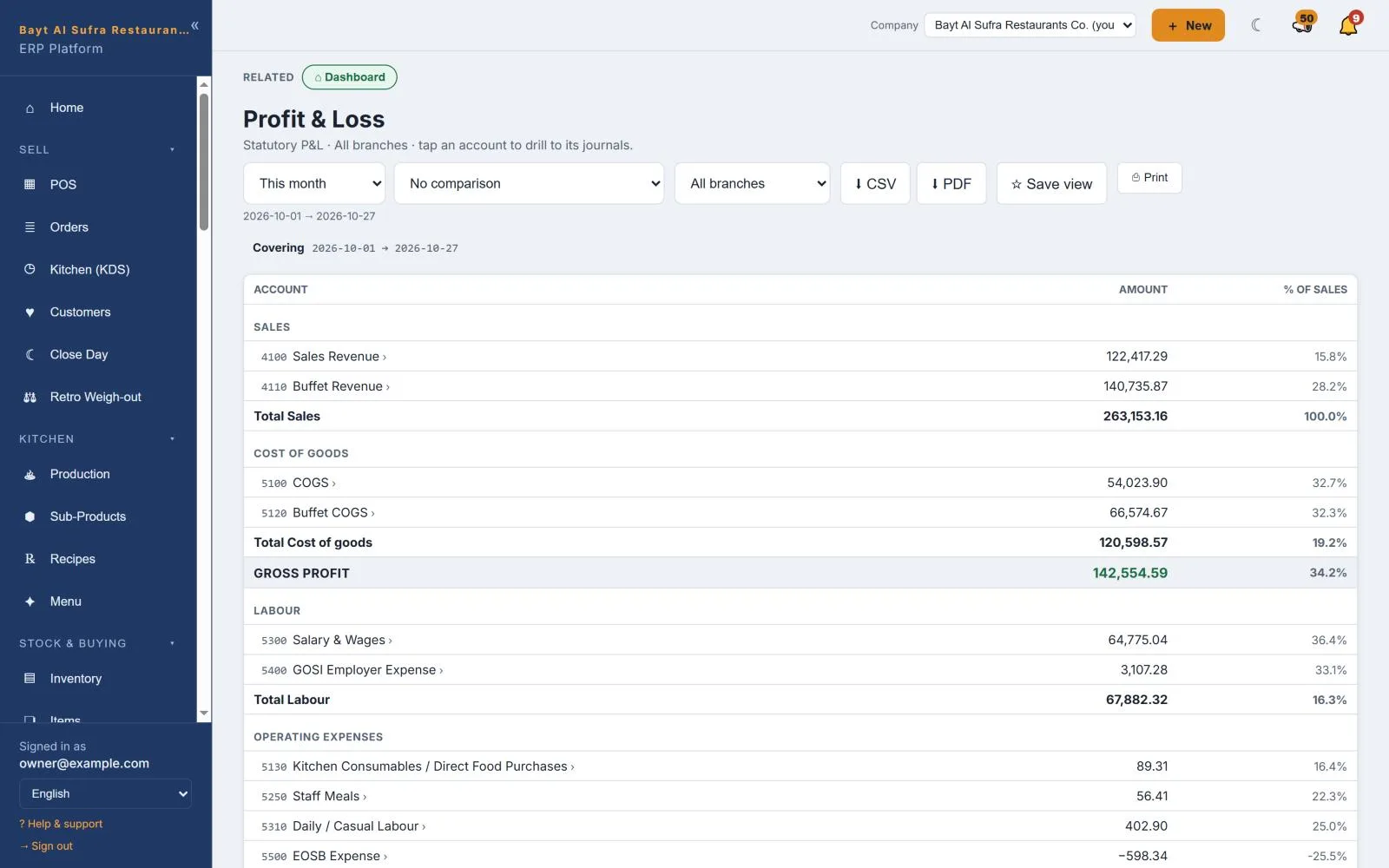
Journals, trial balance, P&L per branch or for the company, balance sheet and cash flow
Supplier and customer accounts with ageing, statements, payments and receipts
Bank statements imported and matched automatically
The VAT return built from the ledger; filed returns and closed periods are locked
Credit notes, fixed assets with depreciation, budgets, and foreign-currency bills and bank accounts
E-invoicing ready: the ZATCA QR on every receipt and ZATCA Phase 2 built in
HR, attendance & payroll — From clock-in to payslip, in one place
Attendance, leave and payroll in the same system as the shifts they pay for — and an app in every employee's pocket.
MyHR on every employee's phone: clock in, request leave, read payslips — in English or Arabic, installed like an app
Clock-in checked against the branch's location, with an optional selfie; punches made offline are queued
Rosters and shift templates, with today's attendance set against the roster
Leave requests, approvals, balances and monthly accrual
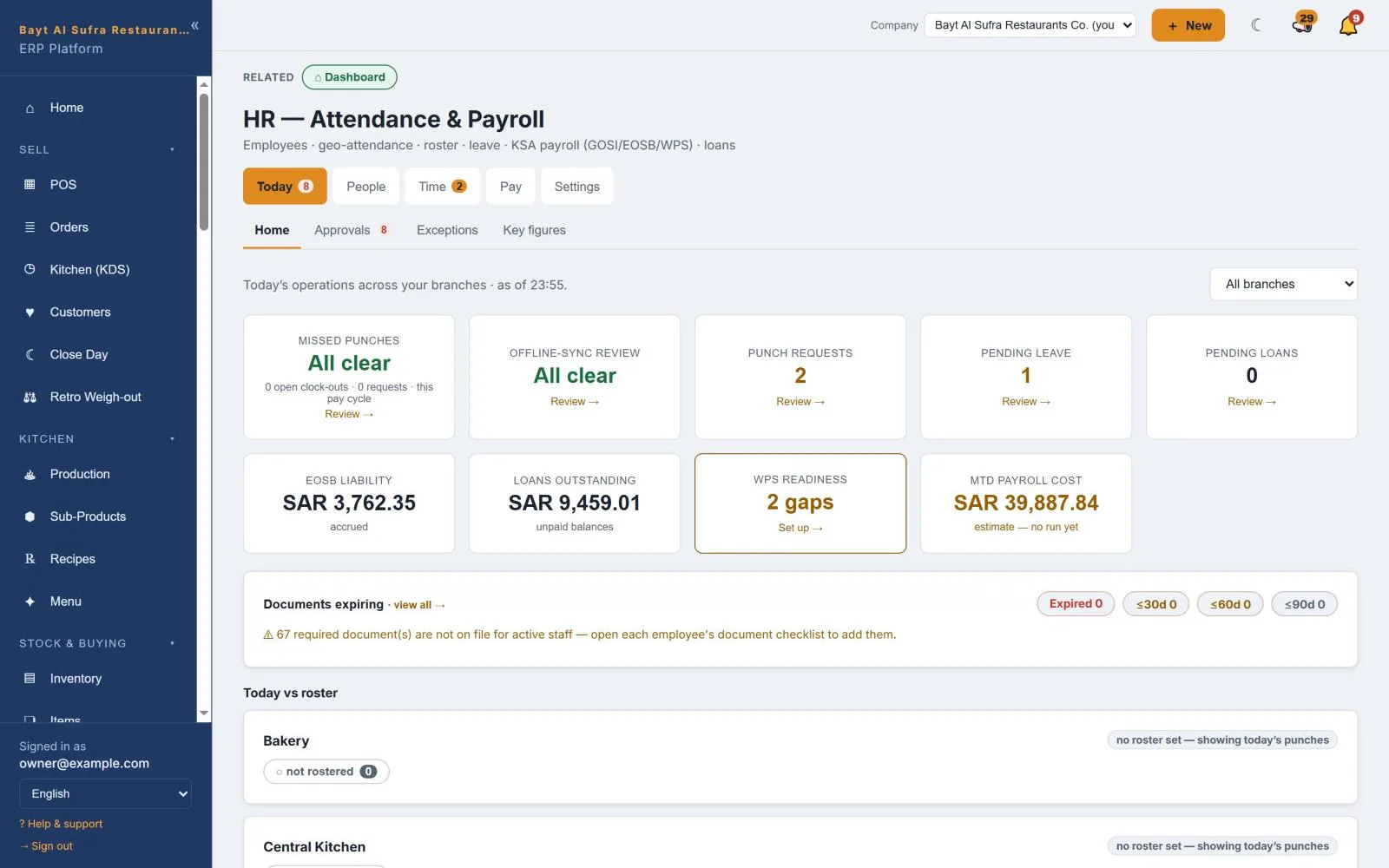
Payroll runs — draft, approve, lock, pay — posted to the ledger, with payslips and bank salary (WPS) files
Employee loans with repayment schedules, end-of-service and final settlement
Catering & events — Quote it, invoice it, deliver it
Catering orders priced per person and invoiced properly, with the food's cost on the books when it goes out.
Quotations from portions per person, with a suggested price per person; cost and margin shown only to authorised staff
A4 quotation and tax invoice PDFs, with the e-invoicing QR
A deposit on the quote, and payments recorded against the invoice with the balance kept
Marking an order delivered relieves the stock and books the cost of the food
Credit notes against a catering invoice
Delivery apps — Delivery apps, priced and reconciled
Orders from the apps are rung at the till; what each app owes you is tracked to the payout. There is no live link to the apps' own systems.
The app recorded as the payment, each app with its own receivable account
Payouts recorded with the app's commission and its VAT
Separate dine-in, takeaway and delivery prices for every item
Switched on per company: the till asks which app and records its order number, with per-app prices set from your walk-in price and editable per branch
Switched on per company: an app's statement imported and matched order by order, with differences sent to a review list
Owner dashboard & reports — Every number, one tap from its source
The figures an owner needs each morning — and the entries behind them.
An owner dashboard where every figure opens the entries behind it
A management report with recommendations, each section exportable to PDF and CSV
Item performance across branches, food-cost reports and saved reports
Several companies with one sign-in, side by side, with consolidated statements and intercompany eliminations
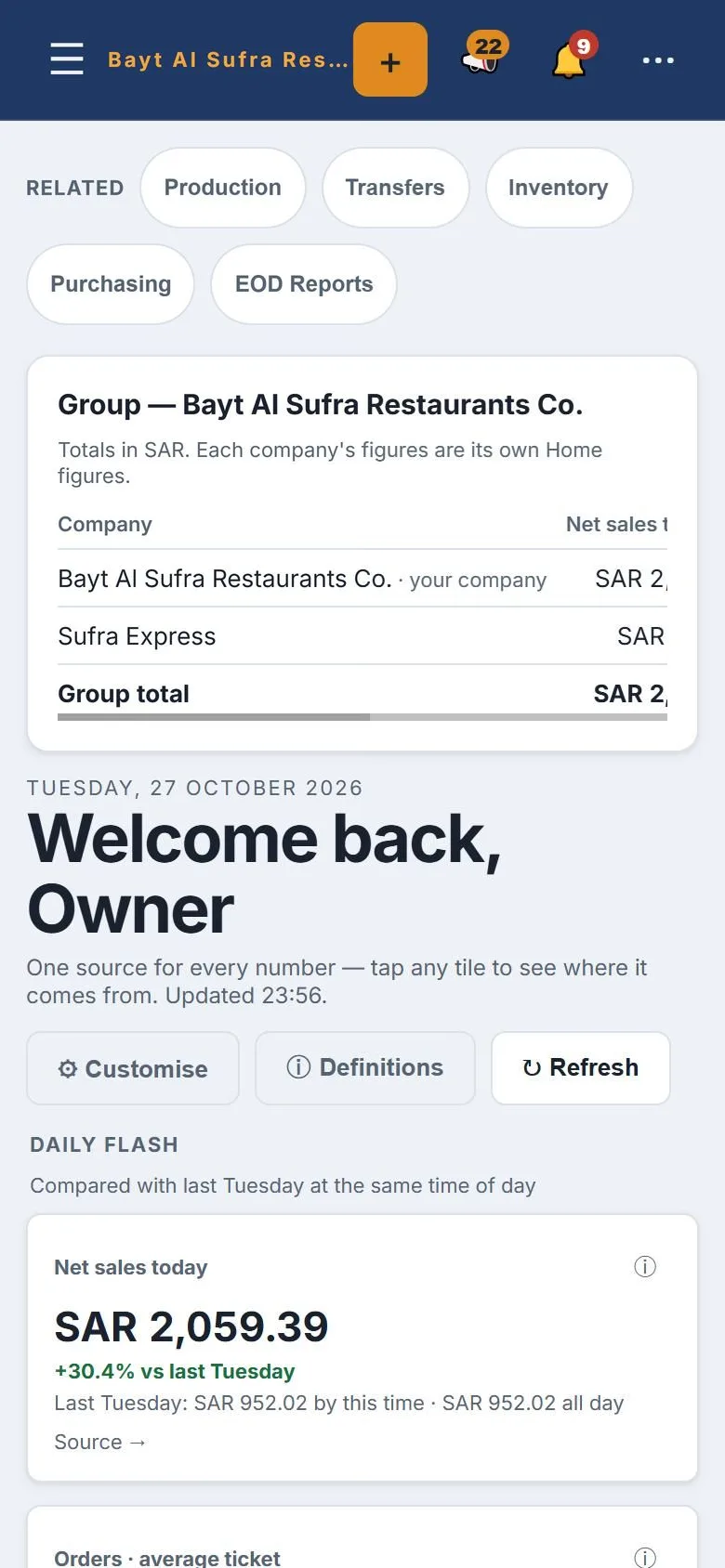
The same dashboard on a phone
Read-only reporting keys for your own BI tools
A buffet costed properly — cover by cover
Few restaurant systems can tell you what a buffet really cost. Restop follows the food from the pan to the books.
Batches cooked for the buffet
A buffet branch sends its production batches to the buffet line by default, each carrying the real cost of its ingredients.
A live cost ceiling during service
While the buffet runs, the cost of everything cooked for it is set against cover revenue so far — the worst case, before any leftover is counted.
Covers counted at the till
Adult and child covers come from the till, at the price each was actually sold at.
Every pan weighed at close
At day close each pan is weighed. What was served — cooked, less what is left, reused or wasted — is the buffet's food cost; waste is booked as waste.
Buffet cost in its own account
Day close posts buffet food cost to its own cost account, next to buffet revenue, so the P&L shows the buffet's margin on its own.
Disposables counted too
Plates, boxes and other disposables issued to the buffet are counted at close: used = opening + issued − left, and only what was used is costed.
Food cost per cover, every day
The buffet dashboard shows food cost per cover and the buffet margin for each day, from the same entries the books hold.
Day close will not post a buffet day with unweighed pans unless a manager records the reason.
Built on a working restaurant, not a whiteboard
Restop runs a multi-branch restaurant group every day — its kitchens, its central kitchen, its buffet, its warehouse and its books. Every feature here exists because that business needed it.
A till your cashiers learn in minutes
Dine-in, takeaway and delivery-app orders on one screen. The kitchen sees the order the moment it is placed, and the receipt is a valid tax invoice.
Split payments, item refunds and a cash drawer per till session
Kitchen screens per station and QR ordering at the table
English and Arabic receipts
Know what every dish really costs
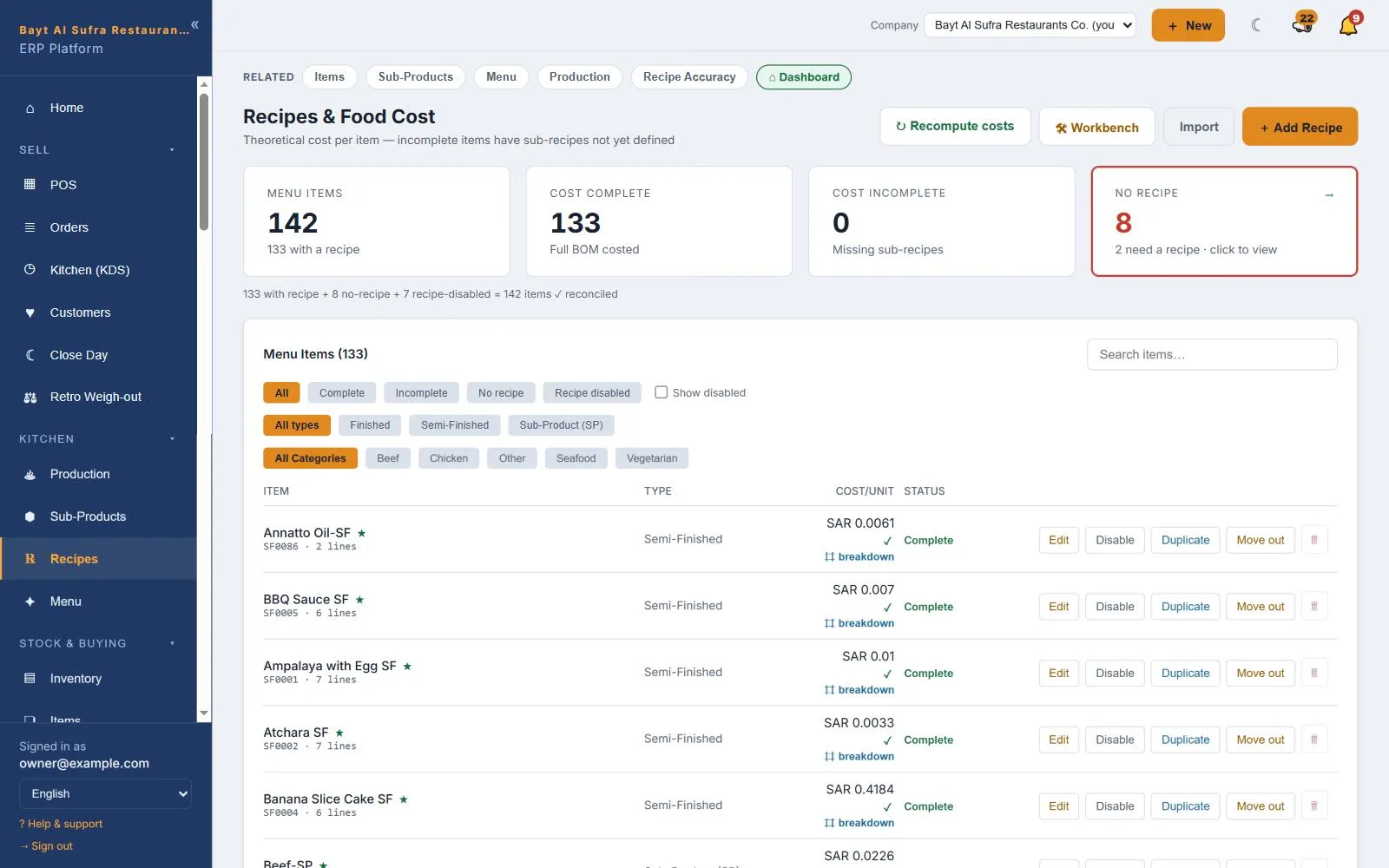
Recipes down to the gram, priced from what you actually paid. When a supplier raises a price, every dish that uses it moves with it — and you see it the same day.
Recipes, sub-recipes and yields
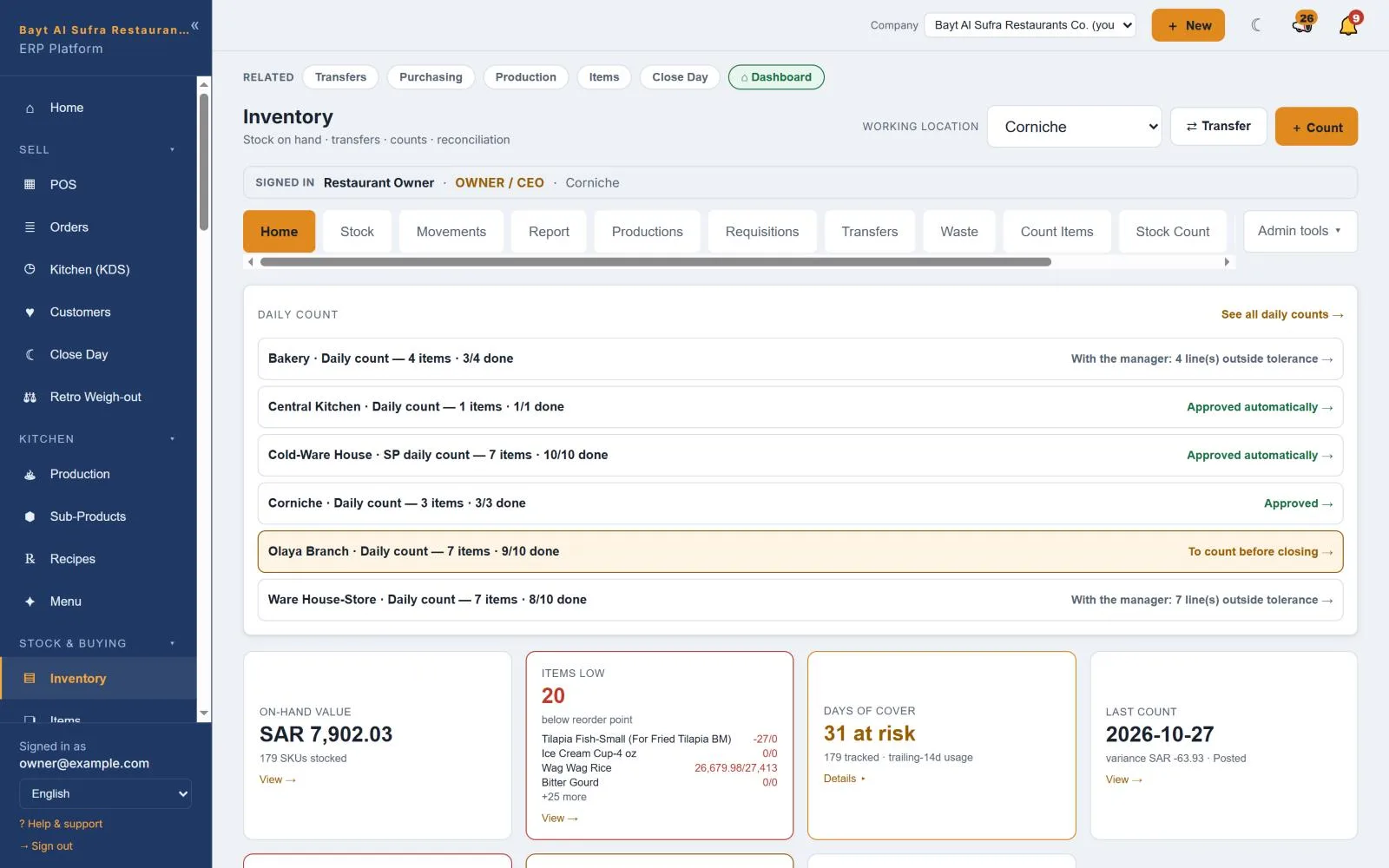
Daily counts that approve themselves inside tolerance
Theoretical against actual food cost
Stock that adds up, branch by branch
Counts, transfers, requisitions and waste in the units your kitchen uses, with stock value and days of cover for every location.
Transfers received at the other end
Low-stock and price-spike alerts
Central kitchen production and weigh-out
Books that close themselves
Every sale, purchase and payroll run lands in a real general ledger. Day close posts the cash, and the P&L is ready for any branch or the whole company.
P&L, balance sheet and cash flow
VAT return built from your own entries
Payroll, attendance and end-of-service
How it starts
No installation and no new hardware. We do the setup with you.
Tell us about the business
How many branches, whether you have a central kitchen, a buffet or a store.
We build your workspace
Your menu, your suppliers, your recipes and your staff — loaded, not left blank.
You open the till
Training on your own data, with someone on the phone for the first week.
Built for the way restaurants actually run
Not for one country's paperwork.
English and Arabic, end to end
Both languages throughout — the screens your staff work in and the invoices your customers receive, right to left where it belongs.
One set of books, many kitchens
Branches, central kitchens and warehouses under one company, with transfers and requisitions between them and a consolidated P&L above them.
Tax for your country
Tax rates, codes and the VAT return set per company. VAT is posted on every purchase and every sale as it happens, and the return is built from what the system already holds.
Your data stays yours
Kept in the cloud, exportable at any time, and never shared between restaurants.
Runs in any country
Restop is the same system wherever you cook. Every country taxes differently, so tax is set up per company: the rates, the tax codes and the VAT return. Whatever your country needs for tax, we configure it with you.
Tax rates and tax codes per company
The VAT return, built from your own entries
Books in your own currency
E-invoicing where required (ZATCA-ready)
Tell us where you trade, and we set up your tax with you before you go live.
See it working
Real screens from the product. Tap any screen to look closer.
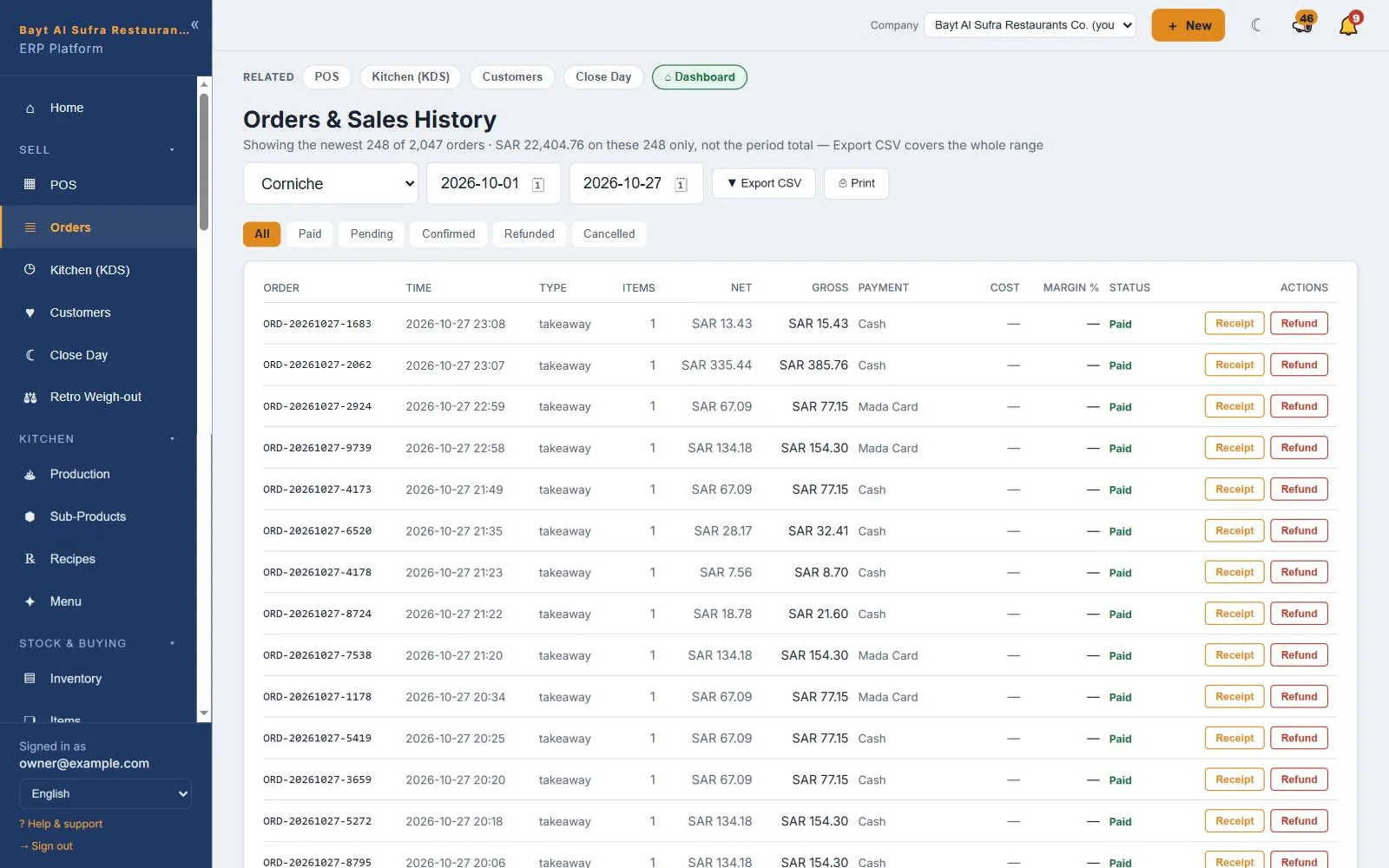
Owner dashboard — Today, the month and the P&L on one page — every figure opens its source.Orders and sales — Every order by branch, type and payment, with receipts and refunds one tap away.Inventory — Daily counts per location, stock value, low items and days of cover.Recipes and food cost — Cost per unit for every dish and sub-recipe, recomputed when prices move.Profit and loss — A P&L straight from the ledger — for one branch or the whole company.HR and payroll — Attendance, leave, loans, end-of-service and payroll cost at a glance.On your phone — The same dashboard on a phone, for owners on the move.
Shown with sample names and figures.
Pricing
Priced by the business, not by the head. One subscription, whole system — accounting, payroll and recipe costing are part of the plan, not modules charged on top. An annual plan is twelve months for the price of ten.
Starter
$53 /month · $531 /year · before tax
One restaurant, one register, up to 5 users
Point of sale and kitchen display
Menu and basic inventory
Purchasing and goods receipts
Day close and cash control
VAT and e-invoicing (ZATCA-ready)
Owner dashboard
Standard
$93 /month · $931 /year · before tax
One restaurant with a store or kitchen unit, two registers, up to 15 users
Everything in Starter
Full inventory with counts and transfers
Recipes, production and yield
Supplier bill capture
Accounting and branch P&L
HR, attendance and payroll
Table ordering by QR code
Group
$240 /month · $2,397 /year · before tax
Up to four units including a central kitchen or warehouse, up to 40 users
Everything in Standard, in every unit
Transfers and consolidated books
Auto-Clerk
Management report
Priority support
Enterprise
$507 /month · before tax
Five or more units, with an SLA and a named account manager
Dedicated onboarding
Service-level agreement
Integrations and data exports
Named account manager
Prices are in US dollars, before tax. The currency you are invoiced in, and the tax added at your country's rate, are set at checkout.
Questions owners ask
How quickly can we start?
Send the form below. We set up your workspace and email your login within one business day, then you have 14 days free — no card needed.
Do we need new hardware?
No. Restop runs in a web browser on the PCs, tablets and phones you already have, and prints to standard receipt printers.
How much does it cost?
Plans are priced in US dollars, before tax, and the price table can show them in your own currency — approximate where they are converted at a stored exchange rate. The currency you are invoiced in, and the tax added at your country's rate, are set at checkout.
Does it connect to the delivery apps?
Delivery-app orders are rung at the till with the app as the payment, each app has its own account, and its payouts and commission are recorded against what it owes you. Switched on per company, each app also gets its own prices and its statements are matched order by order. There is no live link to the apps' own systems.
Does it do attendance and payroll?
Yes. Staff clock in on their own phone, checked against the branch's location; rosters, leave, payroll runs, payslips, loans and end-of-service are in the same system, and payroll posts to the books.
Does it handle our tax?
Yes. Each company has its own tax settings for the country it trades in: the rates, the tax codes and the VAT return. VAT is posted as you trade. E-invoicing is added where a country requires it; ZATCA Phase 2 is built in and switches on once you connect your own credentials.
Can it cost a buffet?
Yes. Batches cooked for the buffet, covers from the till, a weigh-out of every pan at close and the buffet's food cost posted to its own account, with cost per cover for each day.
Can it run several branches and a central kitchen?
Yes. Branches, central kitchens and warehouses sit under one company, with transfers, production and consolidated reports — and a group of companies can sit above that.
Is it really in Arabic?
Every screen, receipt and report works in Arabic, right to left, and in English. Each person picks their own language.
Where is our data, and can we take it with us?
It is kept in the cloud on Microsoft Azure, separate for every company, and you can export it at any time.
We already have a system. Can you move us?
Yes. We load your menu, recipes, suppliers and staff when we build the workspace, so you start with your own data rather than a blank screen.
Which countries does it work in?
Any country. Each company is set up with its own currency and its own tax settings, and we configure your tax with you when we build the workspace.
Start with a real look at your numbers
Tell us about the restaurant and we will set up a workspace with your own data in it.